
Semrush vs Google Analytics: Why Your Traffic Numbers Don’t Match — and How to Track Where Leads Really Come From
Semrush, Ahrefs and Google Analytics show different traffic for the same site. Why that happens, why Instagram and Threads traffic shows up as Direct, and the first-party lead source tracking I use to see which posts bring clients.
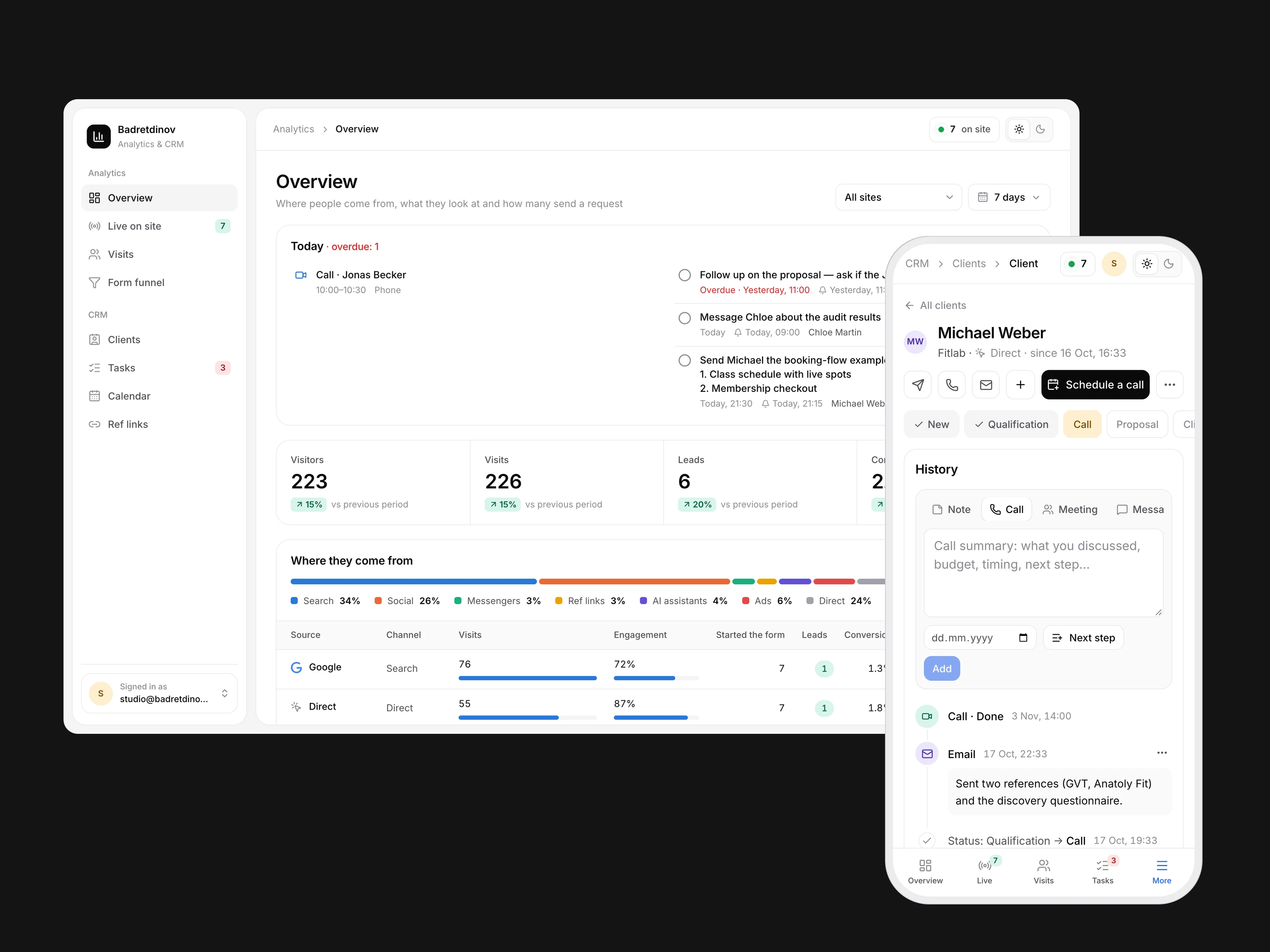
Why is Semrush traffic so different from Google Analytics? Open Semrush, Ahrefs, Ubersuggest and Google Analytics for the same website and you get four different answers. One says 900 visits a month, another says 3,000, a third shows traffic from countries you’ve never heard of.
Someone asked me under a post how I solved this, because it’s hard to trust any of it. Short answer: I stopped comparing estimates and started measuring myself. Below is how I track where leads come from on my studio’s sites, from the first visit to a signed project, and what you can check on your own site today.
1. Why Semrush, Ahrefs and Google Analytics show different traffic
Semrush, Ahrefs and Ubersuggest are built to research other people’s websites. They can’t see your visitors, so they estimate traffic from where you rank in Google, how many people search for those keywords and data from user panels. Semrush itself says its traffic numbers are for benchmarking competitors, not for measuring your own site.
Google Analytics does measure, but it misses part of the picture. Ad blockers and privacy browsers block it, a consent banner turns it off for people who click “Decline”, and some reports hide small numbers behind thresholds.
So the numbers don’t match because the tools answer different questions in different ways. None of them answers the one that matters to a small business: which post brought this client?
Check yours: count the requests you actually received last month. Then look at how many “conversions” your analytics reports. If they don’t match, you’re guessing.
2. First-party analytics: measure on your own domain
The first change was simple: a small tracker on each of my three sites sends every visit to my own server, on my own domain, instead of to Google. Each visit is stored in full: landing page, pages viewed, time and scroll on each page, and every step of the request form.
Because the data goes to my domain, it’s far less likely to be blocked, there’s no sampling, and nothing is shared with an ad network. It’s my data, in my database.
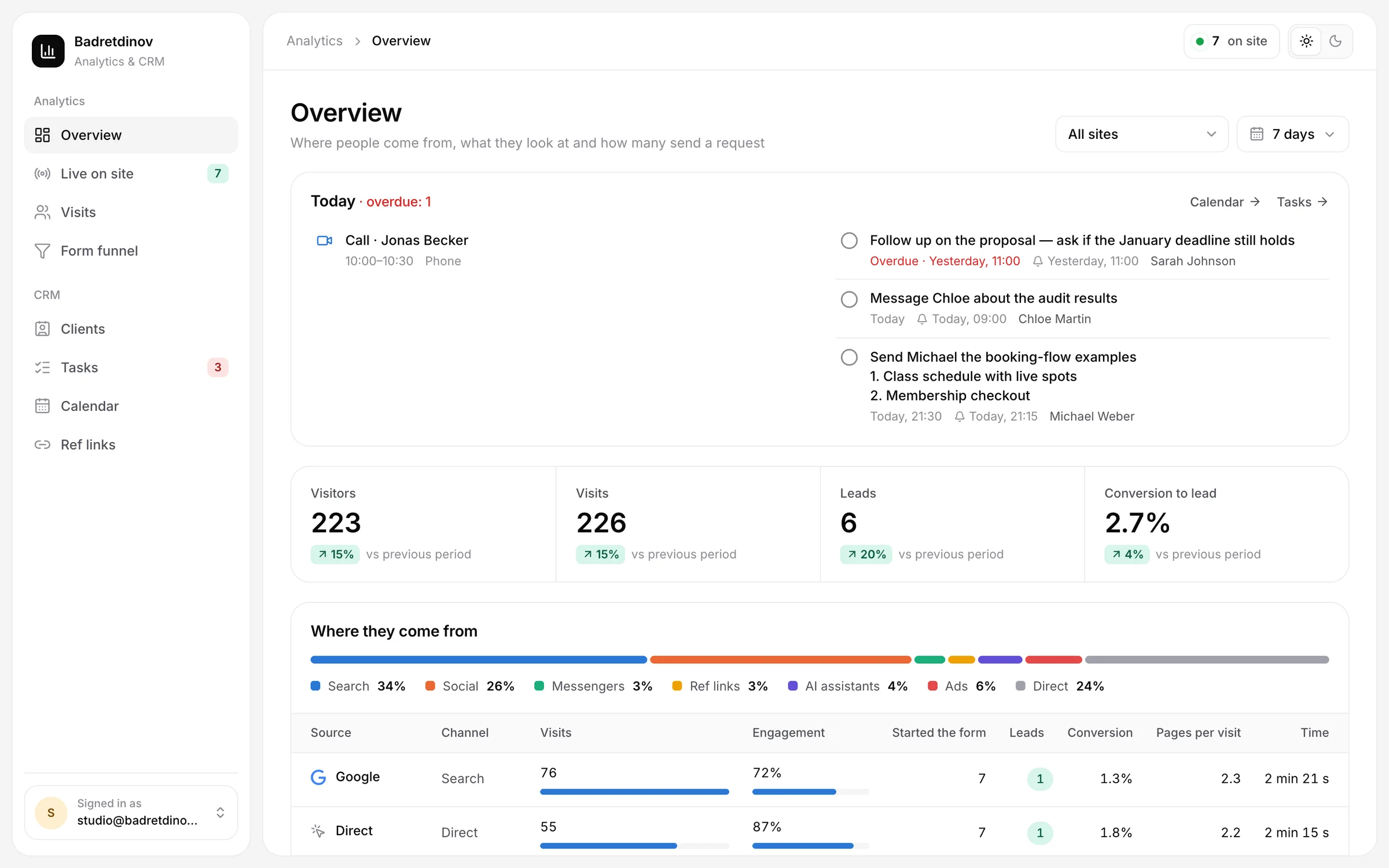
Check yours: does your analytics show form submissions, or just page views? If you can’t see requests next to traffic, you can’t judge a source.
3. How to track where leads come from
“Where did this person come from?” sounds simple. In practice no single signal is reliable, so the tracker combines them:
- The referrer, the page the person clicked from, when the browser sends it.
- UTM tags on links you share yourself.
- Ad click IDs like
fbclidandgclid, so a paid visit counts as paid even without tags. - Your own short links, one per post or profile, so you know exactly which post was clicked.
- In-app browsers, covered below.
- AI assistants, like ChatGPT, as a channel of their own.
The short links turned out to be the most useful. One link per post, and the dashboard shows clicks, visits, form starts and requests for each.
Why Instagram and Threads traffic shows as Direct
Visits from the Instagram and Threads apps open in a built-in browser that often sends no referrer at all. To Google Analytics they look like someone typed your address, so social traffic quietly ends up in Direct. My tracker recognises these in-app browsers by their user agent and files the visit under Instagram or Threads, even when the link has no UTM tags.
Check yours: look at your Direct traffic. If it’s large and mostly mobile, much of it is probably social traffic from in-app browsers.
4. How to filter bot traffic from Meta and Google crawlers
The first day I looked at the raw data, a third of my “visitors” weren’t people. When you share a link, Meta, Google and others fetch the page from their servers to build the preview, and some of those requests look like real visits. On one day, 7 of 22 visits came from crawlers.
Those requests come from known company networks and fixed screen sizes, so the tracker drops them before anything is stored. A link preview never counts as a person, and the numbers stopped looking better than they were.
Check yours: filter your analytics by city. A burst of visits from data-centre towns like Council Bluffs, Boardman or Prineville in the US is usually crawlers, not clients.
5. First-touch vs last-touch attribution
A typical path: someone sees your post, visits the site and leaves. Three days later they type your address and send a request. With last-touch attribution, only that final visit counts: the post gets nothing and Direct gets the client.
So every client card keeps three answers side by side: the first visit we can tie to that person (first touch), the visit with the request (last touch), and what the client says themselves when asked how they heard about the studio.
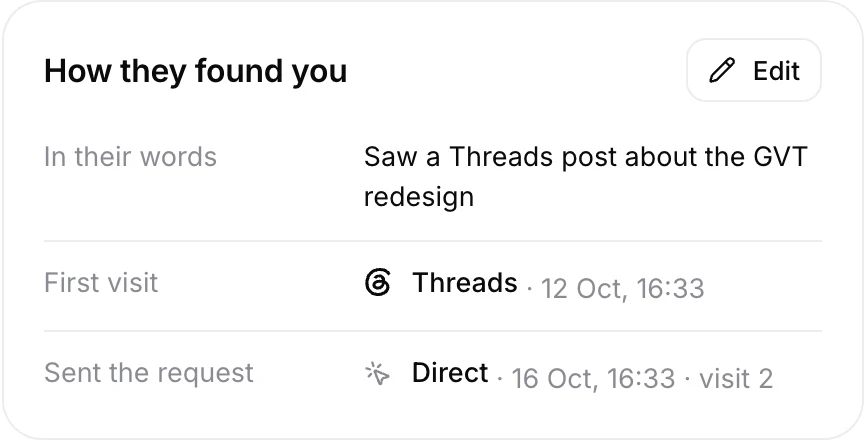
Check yours: ask your last five clients how they found you. Compare it with what your analytics says. The gap is the part your tools can’t see.
6. Find the form step where people drop off
A form that loses people is invisible in most analytics: you see a page view and no request. Because each of my forms is a step-by-step wizard, the dashboard records every step and shows where people leave, per source.
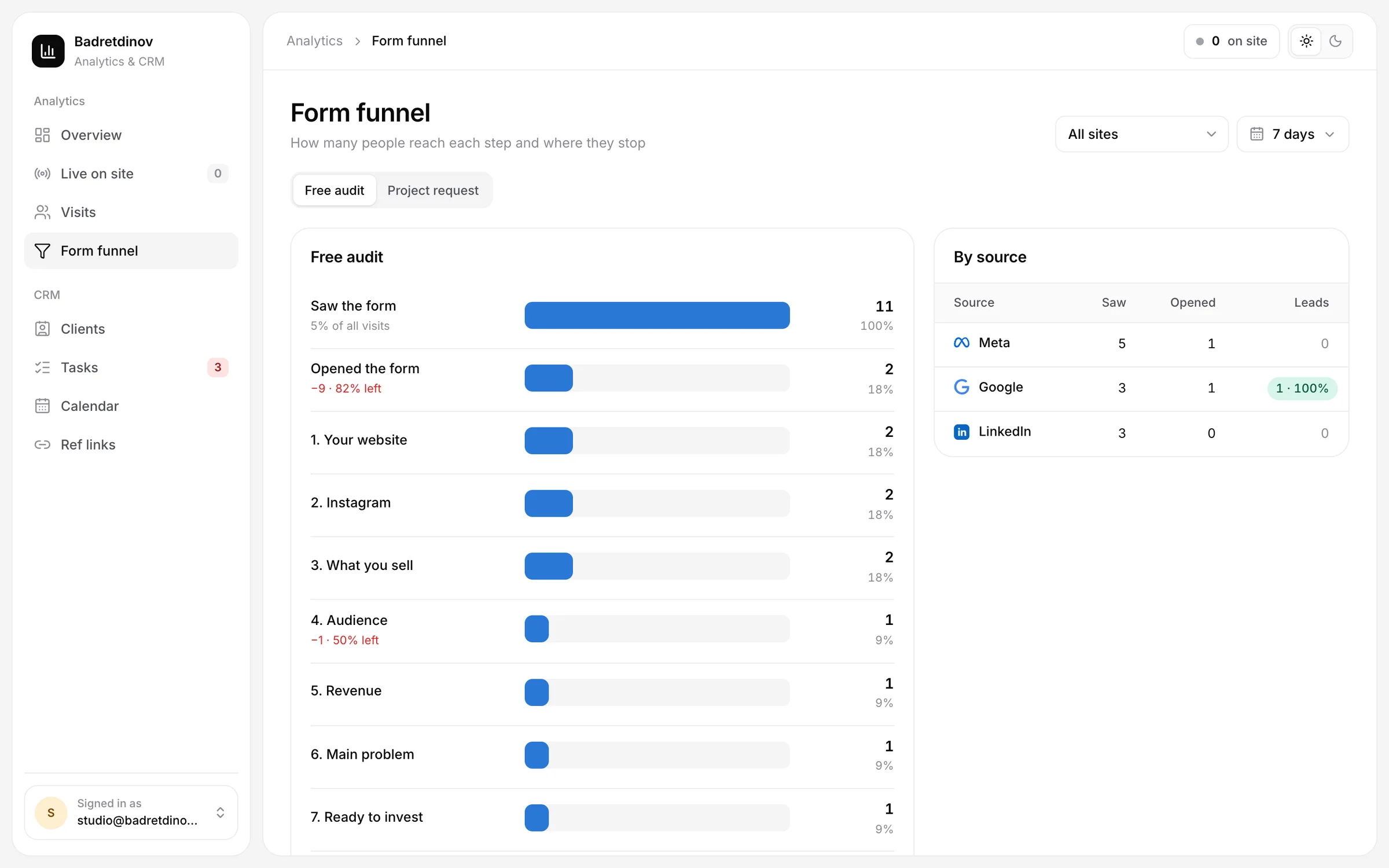
Check yours: start your own form on your phone and stop halfway. Would you know that someone did exactly that?
7. Connect the lead source to your CRM
Analytics only pays off when it ends in an action. A visit that ends with a request becomes a client card automatically, with its source and the whole path through the site attached. Clients who write in DMs are added by hand in a few seconds.
Every client then has a stage, a deal value and a next step. Anyone without a next step is flagged, and reminders arrive in Telegram with buttons to mark the task done or snooze it. That closes the loop: you see not only which post brought traffic, but which one brought a signed project.
What this setup still can’t do
No tracking is perfect, and it’s better to know the limits:
- Phone and laptop are two people. If someone sees your post on their phone and sends the request from a laptop, the first visit is lost. That’s what the “how did you hear about us” answer is for.
- Location with a VPN shows the VPN server, not the person. It’s a hint, not a fact.
- Small numbers swing. With a few dozen visits a week, one good post moves everything. Look at trends over a month, not a single day.
I trust this data not because it’s perfect, but because I know exactly how every number is counted and can check each request against its visit.
A five-minute check for your analytics
- Count last month’s real requests and compare them with your reported conversions.
- Look at how big Direct is, and whether it hides Instagram and Threads traffic.
- Filter by city and look for data-centre towns.
- Give each post or profile its own link, so clicks can’t be misattributed.
- Ask every new client how they found you, and write the answer down.
FAQ
How accurate is Semrush traffic?
Semrush and Ahrefs estimate traffic from rankings, search volume and panel data, so for your own site they can be off in either direction. Use them to compare yourself with competitors, and use your own analytics for real numbers.
Why doesn’t Google Analytics match my real leads?
Ad blockers, declined consent banners and reporting thresholds remove part of the visits, and many sites don’t track form submissions as conversions at all. Comparing GA conversions with the requests in your inbox shows the size of the gap.
Why does Instagram traffic show as Direct in Google Analytics?
Instagram and Threads open links in an in-app browser that often sends no referrer. Without UTM tags, those visits look like typed-in traffic. Tag the links you share, or use a tracker that recognises in-app browsers.
What is first-touch attribution?
First-touch attribution gives credit to the channel that first brought a person to your site; last-touch gives it to the visit right before the request. Keeping both, plus what the client says, shows which posts start relationships and which ones close them.
Want a second pair of eyes?
If you’re not sure which of your channels actually brings clients, I’ll review your site and the path from the first visit to a request, and send you a written audit with fixes ranked by impact. Free.